04 · Ingest documents with layout
Recover the reading, action and page citation from the F-250 fault matrix. Compare what the helpdesk can extract when the same page arrives as a searchable PDF or a scan.
- Part 2
- Build the evidence layer
- Model
Qwen2-VL-2B-Instruct- Data
- Matched synthetic equipment manuals and scans
- Hardware
- Tesla T4 and CPU, in Google Colab

The fault is on one row
You’re back on the facilities helpdesk. The operator has identified fan F-250 and asks for the reading and action printed beside FILTER BLOCKAGE. You have the manual open. You need both fields from that row and a citation to the page. The next row gives an action for a different fault. An extractor that joins them can send the wrong instruction even when it cites the right page.
The manual is synthetic. Its readings and actions are labels for practising extraction.
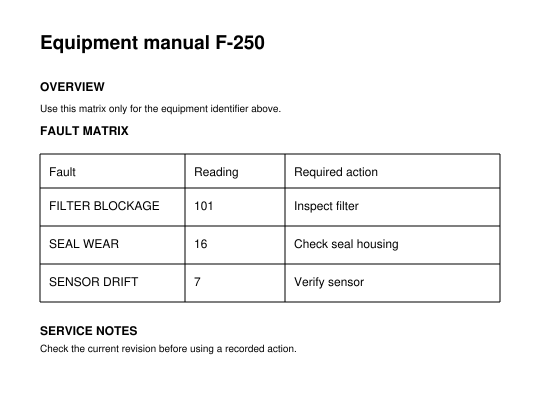
What reading and required action does F-250 list for FILTER BLOCKAGE?
manual-F-250-r3:1
| Fault | Reading | Required action |
|---|---|---|
| FILTER BLOCKAGE | 101 | Inspect filter |
Reveal the two ingestion choices
Select a layout reader when the PDF contains selectable text. For the image-only copy, choose a reader that can see pixels and check the result against the page.
On the recorded searchable copy, the plain reader attached SEAL WEAR and SENSOR DRIFT to the highlighted row. Compare those with the reading and action on the page.
Change one fact. Keep the question, page revision and visible table fixed. The original PDF lets you select the text. The other copy contains the same page as an image. Which reader would you choose in each case? Use the reveal above to check your prediction.
| Same ticket and visible page | What changes | First choice |
|---|---|---|
| F-250 asks for the filter-blockage row | Searchable text PDF | Read the cells using their coordinates. |
| F-250 asks for the filter-blockage row | Image-only scan of that PDF | Read the pixels and verify the recovered row. |
Geometry recovered every answer on text PDFs. Vision recovered them from pixels.
Strict answers out of 12 pages per reader and input, with a paired 95% interval versus layout on the text PDF
1| Reader and input | Strict answers | Difference, pp [95% CI] |
|---|---|---|
| Plain texttext PDF | 0/12 | −100[−100, −100] |
| PDF layouttext PDF | 12/12 | 0[0, 0] |
| Plain textimage-only scan | 0/12 | −100[−100, −100] |
| PDF layoutimage-only scan | 0/12 | −100[−100, −100] |
| Visionpage pixels | 12/12 | 0[0, 0] |
Read the page in the order it was meant to be read
A content stream is a list of drawing instructions. In the searchable F-250 PDF, those instructions emit the fault names, then all readings, then all actions. The printed rules still put each field in the correct cell. A parser that groups every three emitted strings as one row treats the three fault names as if they were a fault, a reading and an action.
The same page then goes through rasterisation. The scan wraps the resulting image in a PDF container. Plain text can read the original drawing stream and PDF layout can recover its geometry. The two PDF methods see no text cells in the raster copy. Vision receives the exact pixels used in that copy once per family.
# The drawing loop emits one column at a time.
for column in range(len(HEADER)):
    for row, values in enumerate(fixture["rows"][1:], start=1):
        page.drawString(
            TABLE_X[column] + 9,
            PAGE_HEIGHT - TABLE_Y[row] - 22,
            values[column],
)# Read the ruled matrix using page geometry.
with pymupdf.open(stream=pdf_bytes, filetype="pdf") as document:
page = document[0]
tables = page.find_tables()
rows = tables.tables[0].extract() if tables.tables else []
text = page.get_text(sort=True)Spatial information matters even outside tables. Pupuk Indonesia and its implementation partners describe using coordinates to organise content in documents with images and watermarks. Their case study reports extraction time falling from 5–10 minutes to 40–70 seconds for their system. Pupuk Indonesia and Google Cloud case study
Docling combines native PDF cells with a table model. Its TableFormer implementation predicts the crop’s structure and maps it back to the original PDF cells. It illustrates a path between the two PDF readers and the full-page model in the lab. Docling technical report
Grade the row and its citation together
A number can be correct in isolation and still answer the wrong question if it belongs to the next row. Measure the extracted value, its record scope and the source location together.
The desk asks for an exact reading and action, both in the matching fault row. A correct page identifier is necessary. It cannot make an incorrect pair valid. The evaluator counts body cells separately to show what survived extraction. It looks up each expected fault label, requires a unique matching row and compares each cell in its original column. The desk attaches the known page identifier after extraction. Vision emits rows and headings, and never receives the source manifest or the correct answer.
# Match the expected label and reject ambiguous duplicates.
matches = values_by_fault[label]
observed = matches[0] if len(matches) == 1 else None

# Grade the assembled answer, including its page citation.
strict_correct = score_answer(gold["expected"], answer)
For a source family and method, the strict score is the product of three exact-match indicators. The fields are the decision, the combined reading and action, and the sorted list of cited pages. The stars denote the expected fields.
F-250 · “What reading and required action does F-250 list for FILTER BLOCKAGE?”
- Expected
- answer · 101 | Inspect filter · manual-F-250-r3:1
- Plain text
- answer · SEAL WEAR | SENSOR DRIFT · manual-F-250-r3:1
- PDF layout
- answer · 101 | Inspect filter · manual-F-250-r3:1
- Vision
- answer · 101 | Inspect filter · manual-F-250-r3:1
Plain text saw the reading and the action elsewhere in the stream. It still put the other two fault labels in the reading and action cells.
The plain reader kept fault labels and lost their readings
Exact expected body cells and readings associated with the correct fault
2| Reader and input | Exact cells | Exact readings |
|---|---|---|
| Plain texttext PDF | 12/108 | 0/36 |
| PDF layouttext PDF | 108/108 | 36/36 |
| Plain textimage-only scan | 0/108 | 0/36 |
| PDF layoutimage-only scan | 0/108 | 0/36 |
| Visionpage pixels | 108/108 | 36/36 |
PubTables-1M separates exact table content from partial agreement. In its canonical test data the authors report exact table content accuracy of 0.9349 on simple tables and 0.2712 on complex tables for DETR-NC. The source domain is scientific papers. The metric distinction carries across to an equipment manual, where spotting some of the right text can leave the record unusable. PubTables-1M preprint, Table 4
Check what a passing row can omit
The F-250 Vision output contains the entire fault matrix. It omits SERVICE NOTES. The notebook reports missing and inverted headings independently because the helpdesk’s fault-row score does not require those headings. A synopsis of the whole page would need a separate contract. The two PDF methods returned an empty row list on the scan and asked for clarification.
F-250 · Same fault matrix as an image-only scan or its source raster
- Scan, both PDF readers
- rows: [] · clarify · no citation
- Vision row
- ["FILTER BLOCKAGE", "101", "Inspect filter"]
- Vision headings
- ["OVERVIEW", "FAULT MATRIX"]
The full source includes SERVICE NOTES. This missing heading leaves the target-row score unchanged.
Vision kept the fault rows even when it missed headings
Heading errors, unexpected labels and failed output checks
3| Reader and input | Order errors / inverted | Missing headings | Extra / duplicate pages | Invalid / capped |
|---|---|---|---|---|
| Plain texttext PDF | 24 / 24 | 0 | 12 / 0 | — |
| PDF layouttext PDF | 0 / 0 | 0 | 0 / 0 | — |
| Plain textimage-only scan | 36 / 0 | 36 | 0 / 0 | — |
| PDF layoutimage-only scan | 36 / 0 | 36 | 0 / 0 | — |
| Visionpage pixels | 10 / 0 | 5 | 0 / 0 | 0 / 0 |
The pattern held across the six source-family groups
Strict passes out of two pages per family group
4| Family group | Plain / text | Layout / text | Plain / scan | Layout / scan | Vision / pixels |
|---|---|---|---|---|---|
| Manual | 0/2 | 2/2 | 0/2 | 0/2 | 2/2 |
| Numeric | 0/2 | 2/2 | 0/2 | 0/2 | 2/2 |
| Multi-source | 0/2 | 2/2 | 0/2 | 0/2 | 2/2 |
| Ambiguity | 0/2 | 2/2 | 0/2 | 0/2 | 2/2 |
| Boundary | 0/2 | 2/2 | 0/2 | 0/2 | 2/2 |
| Follow-up | 0/2 | 2/2 | 0/2 | 0/2 | 2/2 |
All six groups of development families use the same template and fault-row question. The group names identify which families were sampled from the course suite. These results describe the extraction task and its template. Faded print, handwriting, unfamiliar tables and manual revisions remain outside the comparison.
Time the reader after preparation
The notebook measures PDF creation and rasterisation separately from extraction. For F-250, rendering the searchable PDF took 2.56 ms. Rasterising and wrapping it took 56.81 ms. Once the page is ready, PDF extraction times cover opening and parsing the bytes. The Vision timer starts before preprocessing and stops after generation, decoding and GPU synchronisation. The reported PyTorch allocation includes the model weights resident during extraction.
# Synchronise so GPU work lands inside the timed region.
sync()
torch.cuda.reset_peak_memory_stats()
started = perf_counter()
extracted = parse_vision(image, processor, vision_model)
sync()
elapsed = (perf_counter() - started) * 1_000
Reading pixels took seconds. Reading text geometry took milliseconds.
Per-page extraction wall time, with the observed maximum for each arm
5| Reader and input | Median | Maximum |
|---|---|---|
| Plain texttext PDF | 5.04 ms | 21.07 ms |
| PDF layouttext PDF | 43.73 ms | 100.82 ms |
| Plain textimage-only scan | 1.62 ms | 5.60 ms |
| PDF layoutimage-only scan | 2.32 ms | 4.27 ms |
| Visionpage pixels | 10.64 s | 13.04 s |
The twelve Vision extractions each used 1,199 input tokens and generated 87–119 tokens. The lab recorded page wall time rather than service throughput. Parseur uses a distinct OCR stage ahead of extraction and reports an 80% improvement in AI response speed measured in tokens per second. Document preparation and response time have separate denominators. Parseur and Google Cloud case study
Pair the formats by source family
For each family, subtract PDF layout’s score on the searchable page from the candidate score. Resample the resulting pairs by family so the text original and scan always move together. Three cells on one row are part of the same observation for this comparison.
# Keep the pairing keyed to the source family.
assert [row["family"] for row in group] == reference_families
candidate = [row["strict_correct"] for row in group]
interval = paired_interval(group, candidate, incumbent)
Vision and text-layout passed on the same families
Page-level changes relative to layout on the text PDF of each family
6| Reader and input | Wins | Ties | Losses |
|---|---|---|---|
| Plain texttext PDF | 0 | 0 | 12 |
| PDF layouttext PDF | 0 | 12 | 0 |
| Plain textimage-only scan | 0 | 0 | 12 |
| PDF layoutimage-only scan | 0 | 0 | 12 |
| Visionpage pixels | 0 | 12 | 0 |
Every observed pair agrees between searchable PDF layout and Vision on the raster. The derived 95% paired interval is 0 to 0 percentage points because all twelve paired differences are zero. This is a tie on the fixture. On the same searchable input, Plain text missed every paired case. Against the reference, each scan-only PDF arm also lost all twelve, which combines a change of input representation with either a reader change or a fixed reader that now has no text.
What to keep
| Input | Reader | Strict answers | Median extraction |
|---|---|---|---|
| Searchable text PDF | Plain text | 0/12 | 5.04 ms |
| Searchable text PDF | PDF layout | 12/12 | 43.73 ms |
| Image-only scan | Plain text | 0/12 | 1.62 ms |
| Image-only scan | PDF layout | 0/12 | 2.32 ms |
| Page pixels | Vision | 12/12 | 10.64 s |
- Check what the PDF contains. If the page has selectable text, try layout extraction and inspect the fields attached to each label. Selectable text alone leaves reading order unresolved.
- Escalate missing or conflicting rows. A pixel reader can recover an image-only matrix. Before using a recovered instruction, check the correct revision, authorised source, row uniqueness and page citation.
- Track what the workflow needs to review. Stellar’s AWS case study describes sending exceptions to human reviewers after extracting fields and validating against rules. Preserve the source so the reviewer can settle an uncertain row. Stellar Innovations and AWS case study
Next to try, not tested here: lower the raster resolution, add an OCR stage ahead of row reconstruction, or introduce a row that spans two pages. For each change, decide what evidence would make the answer usable before inspecting its result.
How it was built
| Item | Setting |
|---|---|
| Data | One synthetic fault-matrix page from each of 12 development families, two per existing course group. |
| Development digest | 51dbc208b6b20a620237dd76ce0a2db4f10aa75f4f8fc404121e301b8d79a0cf |
| Page and scan | 540 × 400 PDF points. Rasterised at 2× into 1,080 × 800 pixels before embedding the same image in a scan PDF and passing it to Vision. |
| Plain text and PDF layout | pypdf 5.6.1 text extraction with consecutive string grouping. PyMuPDF 1.26.1 table geometry and position-sorted text. ReportLab 4.4.2 generated the source. |
| Vision | Qwen/Qwen2-VL-2B-Instruct, revision 1860c46f12b7449d0f5b426a7474ab715342bc65. FP16, greedy decoding, cap of 160 new tokens. The parser accepts a surrounding JSON fence and checks the row width and field types. |
| Grade | Exact decision, combined reading and action, and page citation. The grader records cell and heading scores separately. |
| Paired interval | Percentile interval from 1,500 resamples of matched source families, seed 401. |
| Recorded runtime | Colab Tesla T4 and host CPU. Python 3.13.16, PyTorch 2.14.1+cu130, CUDA 13.0, Transformers 4.51.3. |
| Saved evidence | Scorecard, all 60 extractions, page manifest, failure gallery, runtime receipt. |
Time and cost. The queue receipt records 252.5 seconds to execute the notebook. The lab timer records 219.65 seconds after bootstrap, including model load and warm-up. The highest recorded Vision allocation was 4.54 GiB in PyTorch, derived from the byte counter. The notebook measures execution and allocation. It has no currency ledger.
Run it yourself
Use Open in Colab and keep the same notebook inputs for the first comparison. The executed T4 notebook includes the measured outputs. The separate F-250 source PDF and scan PDF let you inspect both versions side by side.
| Find this in the notebook | Inspect |
|---|---|
| Freeze a set of pages and Render a searchable page | The F-250 page, manifest and paired PDF bytes. |
| Read the stream, geometry or pixels and Grade the row | The assembled answer and field_results in records.json. |
| Measure the same pages and Compare paired families | comparisons in summary.json and the worked failed rows in the failure gallery. |
Before each change, write your prediction.
- Swap the two loops in
render_pdf, keeping the x and y coordinates fixed. Will Plain text recover the F-250 row? Checkextracted.rowsandstrict_correctfor its searchable PDF. - Change
pymupdf.Matrix(2, 2)topymupdf.Matrix(1, 1). Which column is most likely to fail at the lower resolution? Comparefield_resultsandelapsed_msfor the same Vision page. - Move the target row on one fixture without changing the label, reading or action. Can each reader still find the row by label? Inspect
observed_rowand the cited page.
Lesson 05 · Build and rerank a shortlist asks how to find the right source once ingestion has preserved its contents.
How is this page?
Last updated on